News and thoughts from CS Odessa, maker of the ConceptDraw product line: ConceptDraw PRO, ConceptDraw PROJECT and ConceptDraw MINDMAP.
Showing posts with label information management. Show all posts

Thursday, February 28, 2013

The Life Span of a Mind Map

I've mentioned this in the past. But I continue to be fascinated by people's different interpretations of the "life span" of a mind map. (And by life span, I mean: The amount of time you actively use a given map.)

Annuals versus Perennials
Thinking about maps this way reminds me of plants. There are some plants, like... I don't know... marigolds, that people plant just to add some color to the yard, then yank them up and chuck them in the trash once their bloom is gone. Other plants, like... shrubs... represent more of an investment and usually stay where they are for years.

For some people, a mind map is as ephemeral as a marigold. They create it just to get some ideas clear in their minds, and then file it away somewhere, probably to be never used again.

For others, a map might be something they work on over a period of time, maybe to plan and even manage some kind of project or campaign.

But when the project ends, the map is once again consigned to oblivion. (Savvy map practitioners will keep these maps in a special file to help them plan another similar campaign in the future.)

And then there are maps, like the Master Map I talked about yesterday, that become a part of daily life, constantly updated to reflect the activities of the moment.

Have a Better Idea?
I personally need to find a better way to manage all of my maps. I have a tendency to create a map, put a bunch of information in it, then forget where I put it or what I called it.

Then, when I need that info I put in the map, I have no idea where to find it. (That's happening right now on one of my projects and it's really aggravating. But it is, after all, user error.)

If you have a better solution, let me know... please! :o)

Tuesday, November 20, 2012

Prepare Now for the Next Hurricane Sandy: Communicate Critical Information Faster, Clearer

"MINDMAP's visual interface gives the emergency planning team and our front line hospital staff a clear picture of what needs to happen in each emergency." Jill Collins

A Southern Hospital Creates Rapid-Action Planning
Jill Collins is an emergency management coordinator for a not-for-profit hospital in South Carolina. Part of her job includes managing the protocols, procedures, and policies put into place to deal with threats to the delivery of quality patient care. Collins uses ConceptDraw MINDMAP to manage and communicate planning and preparations for all of these potential problems.

Hobie: You missed the brunt of Sandy, but you still feel motivated to create an emergency plan?
Collins: Our hospital is accredited by The Joint Commission, which requires that we have a comprehensive emergency management program. Thankfully, true emergencies are infrequent... things like bad weather, chemical events, utility failures. Any one of these can compromise the hospital’s ability to function. Keeping staff prepared for events like these is an ongoing challenge. Hobie: Planning your response to emergencies like these must be very complicated. How do you manage it?
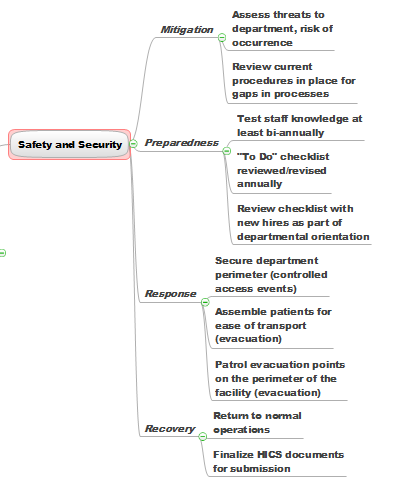
Collins: For each hazard, there are four phases of emergency management: mitigation, preparedness, response, and recovery. Within each of these four phases, the Joint Commission identifies six critical areas: communication, resources and assets, safety and security, patient management, staff responsibilities and utility management.

Inside of that overall planning, I need to be able to communicate specific plans for dealing with hazardous drugs and materials, medical equipment, utility safety, and the near-constant construction projects going on around the hospital. Then I have to explain each of these in relation to the five most likely emergencies, lay out planning for the four phases, and then show how we're prepared for the six critical areas in each phase.

Hobie: I can see how mapping would help. But how did you come to use it?
Collins: I first saw MINDMAP at a Fred Pryor professional training seminar and decided to see if it could help with this presentation. I opened up the program and just jumped into some really complicated brainstorming.

Once I finished that, I went back in and organized everything and added some additional information. Then I pushed a button and exported the whole thing into a PowerPoint presentation. I’ll tell you, seeing the PowerPoint presentations suddenly appear was the coolest thing since sliced bread. And I was just so tickled, because that was my first time using MINDMAP.

Hobie: So you use MINDMAP as a planning tool, then share it as PowerPoint slides?
Collins: No, no. That's just when I need to share an overview with management. Our hospital uses HICS, Hospital Incident Command System, a planning framework that assigns specific job tasks for each staff person’s role in the emergency. MINDMAP's visual interface gives the emergency planning team and our frontline hospital staff a clear picture of what needs to happen in each emergency.

It can also help me get buy-in on the planning since it clearly lays out each person’s role and the impact that role has in our overall handling of the emergency.

Needless to say, being able to confirm their role with a quick glance at a visual map is much easier for staff than having to plow through a text document or decipher a spread sheet.

Hobie: Do you use MINDMAP in any other ways at the hospital?
Collins: We use it when we need to put our heads together and make sure we’re considering all the angles. "Is this one response recovery mode the duty of one nursing only? Or is it nursing and maybe respiratory therapy too—and maybe radiology." MindMap gives us the ability to collaborate on these questions and leave meetings with clear action plans.

Hobie: What would you say is the one big advantage MINDMAP offers over other ways you've tried to communicate complex information to people?
Collins: In any business situation—especially ones when tension can be high, the less wording and more action-oriented items you use to convey information, the better people can focus on the job at hand. The visual display ConceptDraw MINDMAP presents helps everyone focus in on the big things, and helps make complex things much easier to understand and act on.

Learn more about how to use ConceptDraw MINDMAP to solve your business challenges.

Wednesday, October 31, 2012

How to Find a Fresh Angle for Your Writing

Dan Ochiva writes for a select group of top feature film editors. He also runs a popular website, NYCPP: NYC Production and Post News, about film and video production and post-production technology, facility openings and people making film and video industry news in the New York City area.

To stay current with local events—and to stay ahead of industry trends, Ochiva says he searches just about everywhere for news and information. He uses ConceptDraw MINDMAP as a single interface to capture all of these disparate information types.

Hobie: How do you get started on a new article?
Ochiva: Before I start writing, I’ll do a combination of interviews and research. I might visit user forums to see what new issues are on people’s minds, and what’s happening in research and development. I check out industry groups that might be holding meetings or giving talks about future trends. As I go through all this stuff, I'll put it all into a mind map. With so many mixed types of information to deal with, mapping helps me pull it all together and make sense of it.

Hobie: How did you first find out about mind mapping?
Ochiva: I started out just trying to find a better way to manage information. That led me to reading about mind mapping. At first, I did my own version of it. I’d buy these big sketch books—two or three feet on a side—and tape sheets to the wall, and hand draw the maps. I worked that way for a few years, and it helped. But then mind mapping software came along.

Hobie: You wrote an article about storage and networking in film and video post-production. But you were telling me that since these are such big topics, you wanted to find a way to focus what you wrote to help readers get their brains around something so complex. How did mind mapping help you do that?
Ochiva: There’s a certain kind of insight that comes from using mind mapping. I think that's due to a combination of seeing relationships between things and from being able to see everything on one screen. In planning the storage and networking article, I could see at a glance that a lot of people were thinking and writing about how hard it was to get the technology to work with the rest of the editing suite. So that helped me see a trend that I could address in my article. Being able to spot a trend early on is a great skill for a journalist to have, and mind maps really help you see the connections that are leading to trends.

Hobie: So how do you go from mapping to writing?
Ochiva: I use ConceptDraw's built-in numbering capability to organize the different nodes of the map into something that’s more or less what I think the final article will develop into. Then I just export it out as an RTF file, and just go from there. And I find that this saves me time and frustration since I don’t have to go through so many iterations to get to the final structure.

Hobie: Do you see yourself continuing to use mapping?
Ochiva: Oh, yeah. There've been some major changes in the industry over the years. So there’s a lot of information to keep in your head, juggle, and pull together to make sense of new developments. Mind mapping is by far the best way I've found to keep information fresh and viable because I can organize all this information in a way that makes sense to me. Instead of having to review a big file I've created, I can just scan the map. And it's easy to drop new information and ideas into the map as they occur. At the same time, I can visually navigate to go deeper into any one section of the map if I want more detail.

Hobie: Do you think mapping is particularly well-suited to writers?
Ochiva: I think that mind mapping helps you bring form to the information you’ve gathered and the ideas that've come from it. Knowing that you can add structure to information and ideas, and that that structure will make sense to you in the future, that’s a great benefit to me as a writer—and a great relief.

Learn more about how the ConceptDraw product suite can focus and accelerate your thinking.

Wednesday, September 26, 2012

Website Creation Rule #1: Think First

I have to admit: I've used mind mapping software for years. And yet, when I decided to create a website for my freelance writing business, the first thing I did was try to come up with a good home page headline.

Strong words are vital to a home page--any home page. But what makes a site work is the overall design and navigation, and the content you provide to visitors.

So the second thing I did was to open up a ConceptDraw MINDMAP and start figuring out what I wanted on my site. Here are the general areas I broke my site into:

But the more I thought about it, the more I realized that I wasn't presenting myself the way I wanted to be seen by potential customers. The two main things I specialize in are developing strategies that help companies get noticed, and creating content--all kinds of content. Very often, the strategy involves content creation. But not always. So I keep them separate:

So now I have the basic skeleton of what I want my website to communicate. I'll post again soon (I'm not going to commit to tomorrow just in case...) on how to use MINDMAP to capture and organize in one place all the content and links you're going to need for your site.