

One of accounting’s chief concerns is to be as accurate as
possible in describing a business’ financial condition. Businesses rely on accounting,
more today than ever in the history of business. Legislation has imposed new
rules and regulations on the accounting in companies to protect the interests
of people who have a vested interest in those companies. The Sarbanes–Oxley Act
(SOX) of 2002 is well-known for its impact on companies by proving more
accountability for company management.
There are many areas of accounting that benefit from
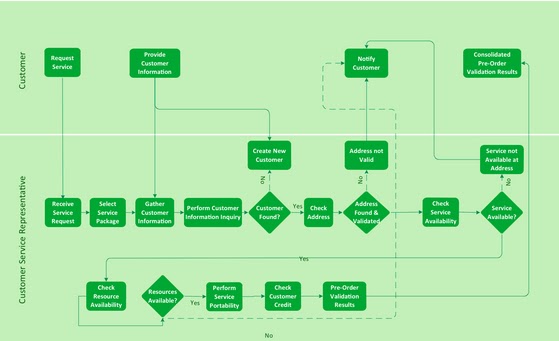
flowcharts that describe processes inside a company. A flowchart can describe
who, what, when, and how a process is managed.
Many times, a flowchart is superior to a written description alone.
Written descriptions can work well, but there are often ambiguities that exist
in the description. A flow chart spells out the process path for all interested
parties.
Take, for example, revenue recognition. Proper recognition
of revenue is important for any public company. Improper revenue recognition
can lead to companies needing to go back and restate financials. Anything that
can minimize the potential for making mistakes on revenue recognition is a
great thing, as the reinstatement of previously declared financials is a bad
thing for any company.
Any changes to standards, such as revenue recognition,
require companies to reexamine their business processes and systems that
underlie the business cycle. This planning process helps companies to define
what changes are necessary to meet the requirements of any new or existing standards. Also, a determination can be made on what
data is needed to capture the flow of accounting tasks and public disclosures.
ConceptDraw Finance and Accounting Area
ConceptDraw PRO, by CS Odessa, has updated and added new
finance and accounting solutions to the ConceptDraw Solution Park for free
download by our customers. These new solutions provide financial managers and
accountants with updated tools for visual financial planning, reporting,
modeling, auditing, and accounting.
The solutions from the Finance and Accounting area extend
ConceptDraw PRO v.9.5 (or later) with financial and accounting diagrams and
charts. The ConceptDraw Solution Park is an area of the ConceptDraw web site
were we continually add new templates, samples, libraries, and functionality to
add value to our customers’ user experience. CS Odessa has launched over 30 new
solutions over the last 12 months, and all of them are available at no charge
for our customers. In addition, ConceptDraw customers have available to them
no-charge technical support. Our support team is standing by to help our
customers stay productive. Support is
available via phone, ticket, and email. CS Odessa strives to be a value and
productivity leader. This is exemplified by our support, product licensing,
learning materials, and commitment to customer satisfaction.
All ConceptDraw products support the latest Apple OS X and
Microsoft Windows operating systems. For more detail please visit the
ConceptDraw product site at ConceptDraw.com.




 Posts
Posts


