News and thoughts from CS Odessa, maker of the ConceptDraw product line: ConceptDraw PRO, ConceptDraw PROJECT and ConceptDraw MINDMAP.
Showing posts with label ConceptDraw PRO. Show all posts

Monday, September 22, 2014

ConceptDraw PRO v10 Supports Visio 2013 File


In the process of conducting business, words alone often do not have the ability to describe a situation, state, or process with enough accuracy to guarantee successful communication to stakeholders, team members, and other assorted individuals. To convey a faultless understanding to others it is often necessary to include graphics and diagrams to support the meaning conveyed. The combination of words and graphics associated to the text is a powerful cohesive means of communication that removes participant doubt and improves clarity. The end result is to accelerate business. Business today is conducted at an incredible rate. The speed of business has increased for organizations of every size and for all participants.

Powerful business graphics and diagramming tools are the norm and not the exception for today’s businesses. For these important visual communication tools to do their job it is often important that they be compatible with a file format that can be easily shared with others. For years the de facto standard file format for business has been the Microsoft Visio™ file format. Many people involved in visual communication need software tools that will read and write the Visio file format.

With the introduction of Visio 2013 Microsoft has changed the native file format used in earlier versions of Microsoft Visio.  With the release of Visio 2013 the native file format is based on a new XML file structure that is highly compressed. The implementation of these file structure changes improves the customer experience. 

As a result when looking for a Visio alternative people, people need the ability to open and save in the newer Visio 2013 file format.  ConceptDraw PRO v10 is such a viable alternative for individuals and organizations that are looking for a professional business solution. ConceptDraw PRO v10 file import and export works round trip with the new Visio VSDX file format; plus ConceptDraw PRO is easy to use, and an economical solution. 

Compatibility
ConceptDraw PRO v9
Concept Draw PRO v10
Microsoft Visio 2013
NA
Import/Export new file format VSDX
Microsoft Visio (previous to 2013)
Import/Export file format VDX
Improved Import/Export file format VDX

An additional plus is that ConceptDraw PRO and the other ConceptDraw products support both Apple OS X and Windows. CS Odessa from the first release of the ConceptDraw product line has designed and built its products to work on both of these powerful desktop systems. 

You or your organization use Macintosh? ConceptDraw is a powerful and inexpensive solution that will address all of your business and individual needs. You or your organization use PCs? Again ConceptDraw PRO addresses your business requirements. You or your organization use both PCs and Macs? Once again the solution to your business graphics needs is clear – ConceptDraw PRO v10.

Other important considerations are that ConceptDraw PRO v10 is a perpetual license, no additional monthly or annual payments required. ConceptDraw PRO is licensed per individual user, making for an economical solution. Our users do not need to individually pay and license ConceptDraw product to run on different operating systems. As a licensed individual user you can run your purchased product on both Macintosh and PC.

When looking for the right graphics software solution, be sure consider the following:

  1.  Open and save to Visio 2013 VSDX file format
  2. Supports Apple OS X and Windows
  3. Open and save Visio VDX file format (legacy Visio format)
  4. No charge technical support (web and phone)
  5. Perpetual license (no additional monthly or annual costs required)
  6. No need to be connect to the web or experience delays when working (internet connection only required for product activation)
  7. Low cost of ownership
  8. Extensive object libraries, samples, and templates included
  9. New graphic solutions available (via ConceptDraw Solution Park) on a frequent basis
  10. Discount pricing is available for academic, nonprofit, government, commercial, upgrade, and competitive upgrades (paid product)
  11. Can be purchased as an economical standalone license or purchased in conjunction with the comprehensive productivity suite of ConceptDraw Office (ConceptDraw Office includes: ConceptDraw MINDMAP v7 - brain storming, note taking, presentations, ConceptDraw PROJECT v6 - project management, resource management, and ConceptDraw PRO v10 business graphics)
When surveying the marketplace for a business graphics software solution, ConceptDraw PRO v10 becomes the clear choice for you and your organization. Try a fully functioning 21 day trial copy of ConceptDraw PRO v10 for free.  Just register on ConceptDraw.com, then download and install to enjoy the next generation of business graphics and diagramming product.

Tuesday, July 15, 2014

ConceptDraw PRO: An Excellent Tool to Describe Accounting Process Flows


One of accounting’s chief concerns is to be as accurate as possible in describing a business’ financial condition. Businesses rely on accounting, more today than ever in the history of business. Legislation has imposed new rules and regulations on the accounting in companies to protect the interests of people who have a vested interest in those companies. The Sarbanes–Oxley Act (SOX) of 2002 is well-known for its impact on companies by proving more accountability for company management.

There are many areas of accounting that benefit from flowcharts that describe processes inside a company. A flowchart can describe who, what, when, and how a process is managed.  Many times, a flowchart is superior to a written description alone. Written descriptions can work well, but there are often ambiguities that exist in the description. A flow chart spells out the process path for all interested parties.

Take, for example, revenue recognition. Proper recognition of revenue is important for any public company. Improper revenue recognition can lead to companies needing to go back and restate financials. Anything that can minimize the potential for making mistakes on revenue recognition is a great thing, as the reinstatement of previously declared financials is a bad thing for any company.
Any changes to standards, such as revenue recognition, require companies to reexamine their business processes and systems that underlie the business cycle. This planning process helps companies to define what changes are necessary to meet the requirements of any new or existing standards.  Also, a determination can be made on what data is needed to capture the flow of accounting tasks and public disclosures.

ConceptDraw Finance and Accounting Area

ConceptDraw PRO, by CS Odessa, has updated and added new finance and accounting solutions to the ConceptDraw Solution Park for free download by our customers. These new solutions provide financial managers and accountants with updated tools for visual financial planning, reporting, modeling, auditing, and accounting.

The solutions from the Finance and Accounting area extend ConceptDraw PRO v.9.5 (or later) with financial and accounting diagrams and charts. The ConceptDraw Solution Park is an area of the ConceptDraw web site were we continually add new templates, samples, libraries, and functionality to add value to our customers’ user experience. CS Odessa has launched over 30 new solutions over the last 12 months, and all of them are available at no charge for our customers. In addition, ConceptDraw customers have available to them no-charge technical support. Our support team is standing by to help our customers stay productive.  Support is available via phone, ticket, and email. CS Odessa strives to be a value and productivity leader. This is exemplified by our support, product licensing, learning materials, and commitment to customer satisfaction. 

All ConceptDraw products support the latest Apple OS X and Microsoft Windows operating systems. For more detail please visit the ConceptDraw product site at ConceptDraw.com.

Tuesday, June 24, 2014

ConceptDraw: A Boon to IT Students and Professionals

Dean Livingston is working on his Masters in Information Technology at the University of Phoenix online. Recently, Dean discovered and purchased ConceptDraw Office at the academic discount to help assist him with his course work. ConceptDraw Office consists of ConceptDraw PRO (business graphics and diagramming), ConceptDraw PROJECT (project management), and ConceptDraw MINDMAP (brainstorming, producing documents and presentations). 

Dean was a long time PC user who switched to a MacBook about 12 months ago. After switching to Macintosh, he then searched for products that could potentially do what Microsoft Project and Microsoft Visio did for him when he was a Windows user. With ConceptDraw Office, he found a suite of products that would address his academic and work needs in one bundle at a greatly discounted price.

Dean discovered ConceptDraw while doing a web search for “Visio Alternatives for Mac”. Right away he decided to download and trial the ConceptDraw suite of products. First use for Dean was ConceptDraw PRO for his “Reliable Backup” class to develop a timeline for how backup should occur as part of a class project. He sees that ConceptDraw MINDMAP will be of great assistance in helping him study for his classes and plan papers while he is working on his Master’s degree.

Dean says, “ConceptDraw Office suite is the best software package, it is amazing how powerful the products are. In the near future, I plan on viewing the instructional videos located on ConceptDraw.com to find out more about each product’s capabilities.”

CS Odessa Announces Software Engineering Solutions in ConceptDraw Solution Park

ConceptDraw Solution Park contains lots of new content that we release for our ConceptDraw products. Today's addition to ConceptDraw PRO and the ConceptDraw Solution Park extends the current vector libraries with a complete software engineering solution. CS Odessa has introduced a new set of libraries that provides a complete solution for software engineering diagrams. The Software Development Area in the ConceptDraw Solution Park includes the Entity-Relationship Diagram Solution, Data Flow Diagrams Solution, IDEF0 Diagrams Solution, and the new-and-improved Rapid UML Solution. These new additions to the ConceptDraw Solution Park are free for current users of ConceptDraw PRO v9.

This solution can be found in the Software Development Area of the ConceptDraw Solution Park which includes collections of templates, samples, and libraries of vector stencils and icons that support software engineering diagrams of any level of complexity. ConceptDraw PRO is compatible with Apple OS X and Microsoft Windows.For more information on all of the ConceptDraw Products and Solutions visit us at http://www.conceptdraw.com.

Thursday, January 16, 2014

Dear Abe, I Have Just Been Appointed the Project Manager of My Group, Help!


Dear Abe,

My boss has designated me to be the Project Manager of my group. I have a basic understanding of what is required, but I am going to need some advice from you.

At any time my department has 10-12 projects on the go. I have a team of about 20 people that I have at my disposal.  I need to figure out how to balance these twenty individuals over the projects that are active, manage the individual project budgets, and keep everyone up to date on what is going on. I need some big help do you have any suggestions.

Concerned,

Matthew Lewis

Hi Matt,

I have some good news for you.  The answer is ConceptDraw Office. ConceptDraw Office is a product suite developed and sold by CS Odessa.  There are three products in this comprehensive product suite. All the products run in native mode on Apple OS X and Windows.

The three products in the ConceptDraw Office suite are ConceptDraw MINDMAP (brainstorming, constructing documents, building presentations, building a process, project management, and a myriad of other uses that will save you valuable time), ConceptDraw PROJECT (the project management muscle of this troika), and ConceptDraw PRO (the business graphics and diagramming portion of the suite).  Each is a useful standalone product that can be purchased separately, but together with their integrations they become one powerful solution.

I will give you a brief example. The ConceptDraw MINDMAP product helps you brainstorm and assemble the projects content.  Working with your team makes it much easier to attain consensus and to build the project structure.  Project phases, tasks, resources can be quickly organized by dragging-and-dropping the information. Launching a project has never been easier.

ConceptDraw PROJECT lets you manage any number of projects and balances your resource s over the tasks in your projects. This will work well with your requirement of having 10-12 projects and one pool of resources. There are a plethora of reports that keep track of how things are going, giving you the ability to track progress and report to stakeholders.  The reports are generated in Excel format so you are free to do additional number crunching and charting. Also ConceptDraw PROJECT can pass your project data to ConceptDraw PRO where dashboards are generated in the blink of an eye. Your project data changes, no problem.  Generate a new dashboard quickly. Everyone has a clear understanding of what is going on.

Also you will find that any of the ConceptDraw products is an economical solution for you and your team members. Detailed information on all of the ConceptDraw products can be found at http://www.conceptdraw.com. There is even a large video library on the web site that will get you up to speed in literally minutes. Matt great question, I am glad I had a solution for you. Now everything should be tickety-boo for you.

Best regards,

Abe

Monday, July 15, 2013

New Process Modeling Tools Now Available at ConceptDraw

I blogged a while ago about how a marketing company owner I know realized, after a discussion with a client, that she needed to do a better job communicating to clients all that's involved in executing a marketing campaign. Her solution was to use ConceptDraw PRO.

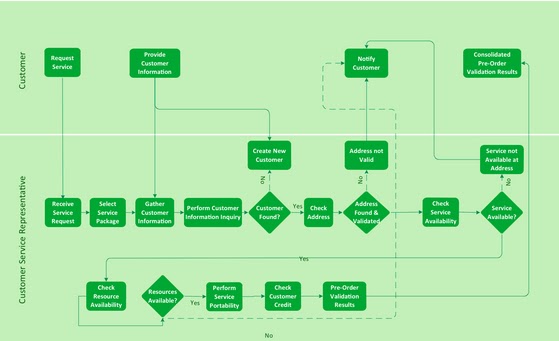
Well, if you think it's time your organization did the same, you might be interested in a new CD PRO solution: Cross Functional Flowcharts.

Here are a couple examples of the kinds of charts you can create:

Process Improvement
This example shows a business process diagram that can be then analyzed for ways to improve the process effectiveness and diagnose quality issues that require resolution:

ESL Communications
The next example shows a workflow for replacing engine oil. It explains all the steps clearly and visually:

Diagrams like this can be used for training. And with our increasingly multicultural work force, visual images like this can help communicate processes to people for whom English is a second language (ESL).

Vector Graphics
The Cross Functional Flowchart solution extends ConceptDraw PRO v.9 software with templates, samples, and a library of vector shapes for drawing the flowcharts. The charts can help you visualize and communicate the operations of a business process flow step-by-step, with the responsible people or departments for each operation clearly indicated.

All source documents are vector graphic documents. They're available for reviewing, modifying, or converting to a variety of formats (PDF file, MS PowerPoint, MS Visio XML, and many other graphic formats) from the Template Gallery of ConceptDraw PRO. You must have the Cross-Functional Flowcharts solution installed to access these documents.

Thursday, May 9, 2013

Lawyers: Help Startups Make Good Decisions

Last week I spoke with Russell Case, an attorney here in Boise. He just started using ConceptDraw MINDMAP in his legal practice and is pretty thrilled with the results.

Case's work falls into three main categories: corporate expansion, international law, and business startups. While each category is unique, they all have one thing in common: Success depends on his clients fully understanding the choices before them and the implications of the choices they make.

“By using MINDMAP or PRO," Case says, "I can create a visual document that shows them where they are now, where they’re trying to get to, and the decisions they’ll most likely have to make on the way. What’s so great about these programs is that they make it easy for me to show them the most likely implications of each decision. That makes for a much more informed client—one who is able to make better decisions.”

Case says he works with startup clients to, for example, brainstorm around the things they’ve looked at to confirm their market analysis—the size of the market, their opportunity, who their ideal customer is, how their product of service is different from competitors. He talks to them about their intellectual property, what they’re trying to create, when they will need money, and how much they’ll need.

“I can capture all this information from them in real time, drill down into each one as much as we need to, organize it all into a logical structure, and then use it to build the story they’ll present to investors. It’s an incredibly efficient, thorough process.”

Monday, April 29, 2013

Free Upgrades to ConceptDraw PRO

CS Odessa has just announced important free upgrades to the company’s ConceptDraw PRO business graphics and diagramming package.

ConceptDraw PRO 9.4 features an enhanced startup wizard, new connectors technology and ConceptDraw Solution Park additions to help users produce professional results more quickly, easily and cost effectively. The upgraded ConceptDraw PRO package demonstrates CS Odessa’s ongoing commitment to continuously improving its solutions suite.

Improvements include:

  1. A new Start Up Wizard that allows users to set basic formatting features.
  2. Arrows 10 technology to streamline object linking.
  3. New Solution Park enhancements, including new templates and libraries to help users quickly and efficiently produce professional results.

"The new startup wizard can help users begin each new project more efficiently and effectively," says Olin Reams, General Manager, VP of Sales & Marketing Americas at CS Odessa. "Smart Connectors technology enhances the intelligent design of the product since it fits the way people think instead of program operations."

Monday, January 28, 2013

The Graphics-Happy Auditor: A Story with Accompanying Fables

I mentioned in a previous post that some of the big auditing firms are now recommending that their clients start creating flow charts. These firms say that not only do the flow charts help regulators understand a company's internal financial controls much faster, but they help companies themselves understand these controls.

I thought it might be helpful to present an excerpt from a conversation I had with the auditor in question, Brianna Reams. She starts out her discussion with a story:

The Hart in the Ox Stall

An Aesop Fable for the Modern Age
Once there was a company that, twice a year, hosted a glittering award show in Manhattan. They invited key customers, served an elegant dinner, and spent a couple of hours recognizing some of the people who had made their company a success.

This went on for a decade, until one fateful day an auditor unearthed a document that showed that something was amiss. Buried deep in the company’s ledgers was evidence that for years it had incorrectly recognized the expense for these lavish events. The company had considered the costs as operating expenses. But the auditor correctly informed them that these were contra revenue expenses—money spent as an incentive for people to buy their product.

It seemed like a small mistake… probably innocent too, given how murky accounting regulations can be. But the repercussions were anything but small. It meant that the auditing company had to go back in and do a considerable amount of to reclassify the expenses.

Extra work by the auditors cost the company a tidy sum, and it meant that the company had to push out its filing date...which had its own dire consequences since delays like that send a bad signal to the market.

The One-Eyed Doe

And That's the Good News
But it could have been a lot worse. If the faulty expense recognition had had a bigger impact on the company’s financials, it might have had to restate its earning. That could cause the company to lose credibility, and might result in its stock getting slammed and put critical financial resources out of reach.

And these are only some of the consequences. Companies can lose revenue, or force them go back and restate when their revenue could be realized.

Hercules and the Waggoner

Flow Charts Can Be Very Expensive to Create... or Not
“I’m an auditor for a Big Four company,” says Reams. “Our job is to look at the financial statements of Fortune 500 companies for possible errors. More and more, we’re asking our clients to capture their internal controls as flow charts.”

Reams says that central to their ability to perform accurate audits is a clear understanding of the client’s processes for specific cycles—especially the financial reporting and revenue receivables processes.

“We’ll perform like a walkthrough and talk to the client to gain this understanding, and part of coming to that understanding is looking at a flowchart. We can create the flow chart. But hiring an external entity to create these flow charts can be a very expensive proposition. That’s why many clients are choosing to create their own.”

The Tortoise and the Hare

Make it Easy-Peasy for Your Auditors
Reams says it is very helpful to be able to look at the flow chart and see at a glance if the company’s internal processes make sense.

Yes, it is possible (and required) to capture these variations in text. But there is no need to limit yourself to what the regulations call for. The ultimate goal need not be to simply conform to the regs. It can be to do what is required—but to do it in a way that makes the process faster, less expensive, more transparent, and more reliable.

Tuesday, January 15, 2013

Will Flow Charts Become Mandatory Business Documents?

I was talking to a local marketing company CEO last week and got on the subject of flow charts. As it happened, the CEO had received a rare complaint from a client recently, which led the CEO to try ConceptDraw PRO for the first time.

Things Just Seems to Get More Complicated
Her decision to use PRO grew from her sense that the problem with the client really had to do with the fact that neither the client--nor her own staff--really understood the process behind the creation of marketing material. She said that at one time the materials had been so simple that there was no need to document the process. But that had changed as the market grew more complex.

And so very early one morning the CEO got up and opened ConceptDraw Pro for the first time. A few hours later, she had a flow chart that she now gives to all of her clients.

Not Just A Good Idea: It Could Become Law
Hearing her story reminded me of something another ConceptDraw PRO user told me. This person is an accountant with one of the Big Four accounting firms. She said that more and more often, the body that regulates auditors, the Public Company Accounting Oversight Board or PCAOB, is asking companies to provide it with a flow chart that explains the controls the company uses to manage its accounting processes.

So on one hand we have a company that's creating flow charts to help it communicate with clients and with itself. And then we have a government agency that now requests (and, reportedly, will soon require) public companies to create these kinds of flow charts.

Do Pictures and Images Count Yet?
This is interesting to me because it marks what I think is a shift in acceptance among business users of so-called "graphic documents" like flow charts and, yes, mind maps. You might well argue that there are all kinds of graphic documents used today, such as project management charts and slide shows. I guess what I find significant is that graphic documents are now being used to communicate non-technical subjects and that they are often the prime document, not supporting, document.

Once You Make It Clear, It's Clear
So... when was the last time you communicated using graphic or visual images to represent the information you want to share? Are parts of your business hard to explain to your clients? Would it help you to have a clear represention of a business process? If you bought ConceptDraw OFFICE and have never played around with ConceptDraw PRO, give it a try. There is a lot of clarity--and maybe even some peace of mind--to be found.

Monday, November 5, 2012

See Your Sales Data Graphically, Updated Instantly

CS Odessa has a lot of interesting videos on its website. This one, called How to Connect Dashboard to Data, shows you how to connect data to any of the various visual dashboard tools available in ConceptDraw Pro.

The cool thing about this is that it's very easy to do. Some of us like nothing better than to see spreadsheets of data. But for the rest of us, this video shows how easy it is to take any data stream and connect it to a speedometer-type visual object, or different kinds of live bar graphs as shown in the image above.

ConceptDraw PRO reaches into your data source every 5 seconds and refreshes the visual object.

Pretty cool if you like to see your up-to-date sales pipeline at a glance.

Find out more about ConceptDraw PRO.

Thursday, May 31, 2012

Vehicular Networking Solution Blog


CS Odessa’s latest addition to ConceptDraw Solution Park is the Vehicular Networking Solution for ConceptDraw PRO. Developed with assistance from researchers at Concordia University, this Solution puts ConceptDraw PRO at the forefront of diagramming for an exciting and rapidly growing area of network administration: global/vehicular networking.

This Solution contains two new templates (with example drawings), and  a huge variety of new library objects, all custom tailored to meet the challenges of mapping mobile Wi Fi networks onboard planes, trains, automobiles, and many more. The included templates help network engineers represent both local and global vehicular networks.

The first template, Local Vehicular Networking, is best used to describe communication between vehicles and stationary nodes in wireless networks, and to account for challenges presented by architecture within those networks. The second template, Global Networks, can be used to map wireless communication between vehicles, earth-based nodes, and space-based nodes on a continental and global scale. The library for this template also includes large architecture elements such as cities.

The new templates and library objects are an essential toolkit for todays’ network administrators, as demand for mobile Wi Fi shows no signs of slowing and vehicle manufacturers are racing to add hotspot technology to their products. Line objects specifically styled for representing fiber optic, wireless, and sensor network connections make visualizing connections between satellites, planes, transmitter towers, ships, cars, and many more virtually effortless.

Putting vehicular network diagrams together using these elements is simple and efficient. Check out these quick video tutorials to get an idea of how easily you can get started with the ConceptDraw Vehicular Networking Solution.


 21 day free trials of ConceptDraw PRO 9, the Vehicular Networking Solution, and all ConceptDraw products are available on ConceptDraw.com. Click on “Join Us” in the upper right of the homepage to get started. You can also follow @ConceptDraw on Twitter to stay current with the latest news and product releases. And of course stay tuned to our blog here for more tips, tricks and exciting announcements!   

Thursday, January 19, 2012

CS Odessa Exhibits ConceptDraw at MacWorld 2012

That’s right: CS Odessa will be exhibiting at MacWorld this year and we could not be more excited! To celebrate, we’ll be offering a special on ConceptDraw Office that you’ll have to see to believe. The ConceptDraw Sales team will be in Booth #625 for the whole show, fielding questions and taking orders. This is an incredible opportunity to pick up the complete family of ConceptDraw products at a totally unprecedented value. Come see why ConceptDraw is the premiere cross-platform visualization and business productivity solution in the world, and take it home for a fraction of the usual price!

But wait, there’s more! We want to see you, our loyal readers, at MacWorld. So we are offering the first 100 people that follow this link http://rcsreg.com/macworld/CGA35239 a free guest pass to the show. You read that right: FREE for the first 100 people that register! So don’t wait. Click the link and register, and then check out ConceptDraw at Booth #625 in the MacWorld|iWorld Expo at Moscone Center in San Francisco, January 26-28, 2012. See you there!

Friday, December 23, 2011

Computer & Networks Solution, Part 1

The Computers & Networks Solution has been one of our most popular Solutions since the launch of ConceptDraw PRO v9. Designed with IT professionals in mind, but easy enough for anyone to use, this Solution provides library objects, templates and examples for documenting network installations of any size. Documenting your network is critical for planning changes and growth: you need to know where you’ve been to know where you’re going. Now you need look no further than the templates in the Computers & Networks Solution for help creating documents that describe the structure and location(s) of your network.


Cisco Sample Library in ConceptDraw PRO v9

First we have the Network Logical Structure Diagram. This is a high-level conceptual tool for visualizing your network. It’s important to understand the flow of data from outside your network to the various places in your organization before you get down to the nuts and bolts of which hardware goes where. Using the provided library objects and sample diagrams, you can create a flowchart that very accurately describes the zones of your network and how information enters and moves through them.

The next step is creating a Network Communication Plan. This diagram illustrates the physical location(s) of your network devices. This template is best implemented in two phases. First, map out the floor plan of the network location. Then draw in your network communication lines, wall sockets, etc. Closely related to the Network Communication Plan is the Network Layout Diagram. This is another floor plan type template the documents the positioning of the actual networked devices. Using these two templates in conjunction will create a very detailed depiction of your network’s physical makeup. Try using different layers for communication lines and hardware devices; then you can view one or the other by toggling layer visibility.

The Rack Diagram template is necessary for larger network installations. Using the template you can diagram server racks and the connections between devices in them. The basic rack object in the template can be resized by selecting it, then clicking the Action button (blue arrow) that appears. Add new pages to the document for each different rack. Then you can add hyperlinks to your Network Layout Diagram that jump directly to the diagram for each rack.

This first batch of templates is a great starting point for documenting your network. That will be plenty for you to chew on this week; next week will pick up where this left off and discuss the rest of the Computers & Networks Solution’s templates and some tips and tricks for implementing them. Stay tuned!

Free 21 day trials of ConceptDraw PRO and the Computers & Networking Solution are available on ConceptDraw.com

Wednesday, October 19, 2011

CS Odessa Reduces Price on ConceptDraw MINDMAP v7

Many have discovered the benefits that mind mapping brings to their work, studies, and personal development. Mind mapping helps manage all daily tasks faster than ever before. Use mind mapping to power through obstacles, leap from one work scenario to another without missing a beat.


Professionals after seeing the benefits of mind mapping, have also seen software prices climb. The cost to be more efficient has just gone up. Want the increased productivity, but the thought of paying more is not appealing.

In response to customer feedback, CS Odessa is reducing the price of ConceptDraw MINDMAP to the pricing of our previous product version (single quantity) from $219 USD to $199 USD. We are rolling our prices back to the same level as our previous products. Now buy our newest version, and get:

- Apple® OS X Lion® compatibility

- Microsoft® Windows® 7 (32bit/64 bit support) w/ ribbon interface

- Import and export Microsoft Project® files

- Built-in presentation mode with export to Microsoft PowerPoint® or Apple Keynote®

- Import and export Mindjet® MindManager® maps

- Generate, publish and track Tweets from a mind map

- Embed documents into your mind map file for easy sharing of information with others

- Multiple display capability

- ConceptDraw Solution Park adds valuable plugin solutions to core ConceptDraw MINDMAP

- Generate task and milestone reports based on project data
  • Organizational Charts *
  • Risk Diagrams *
  • Fishbone Diagrams*
  • Etc.
Continue to receive our no charge technical support (phone and web-based tickets), all minor upgrades at no charge, and access to new ConceptDraw Solutions as they are released. The combination of product functionality, exemplary support, innovative solutions, and lower cost of ownership make ConceptDraw MINDMAP a winning strategy for any individual or organization.


* also requires ConceptDraw PRO v9 to be installed