You can find out more about CS Odessa and our ConceptDraw products from here.
Wednesday, July 16, 2014
ConceptDraw MINDMAP Listing Accounting Resources
You can find out more about CS Odessa and our ConceptDraw products from here.
Tuesday, June 24, 2014
ConceptDraw: A Boon to IT Students and Professionals
CS Odessa Announces Software Engineering Solutions in ConceptDraw Solution Park
This solution can be found in the Software Development Area of the ConceptDraw Solution Park which includes collections of templates, samples, and libraries of vector stencils and icons that support software engineering diagrams of any level of complexity. ConceptDraw PRO is compatible with Apple OS X and Microsoft Windows.For more information on all of the ConceptDraw Products and Solutions visit us at http://www.conceptdraw.com.
Wednesday, December 19, 2012
How much do you pay for team communication? Look at Skype and ConceptDraw MINDMAP as low-cost highly-effective tools
One low-cost service that has seen increased use since its inception to improve communication is Skype®. With over “250 million active users each month [and] over 115 billion call-minutes logged in quarter 2 (of 2012), alone,” Mark Gillet, Skype’s Chief Development and Operations Officer Skype is a clear leader in cost-effective communications. Now, CS Odessa has capitalized on that popularity and released a new feature for ConceptDraw® MINDMAP that instantly shares and opens presentation documents for each attendee before the presentation begins.
Since both ConceptDraw MINDMAP and Skype are Windows and Mac compatible, all users have the freedom to access and edit documents mind map documents on their own system while a presentation is underway. Furthermore, even if a mind map was created using other ConceptDraw products, such as ConceptDraw Project, the users can still view the entire document using just ConceptDraw MINDMAP and Skype.
One of the best features of ConceptDraw MINDMAP its cost-effectiveness. For $199 per license, you get a powerful mind-mapping and presentation tool. Using MINDMAP with Skype Presentation, MINDMAP delivers empowering interoperability features that can support meetings, briefings, and brainstorming sessions from across the world with heretofore unseen accessibility, ease-of-use, and power. Combined with Skype’s low or no-cost, Skype Presentation Solution for ConceptDraw MINDMAP gives users a high-powered efficiency tool raises project success-rates dramatically.
Tuesday, October 23, 2012
How to Write Like a Consultant
Have you ever had a writing assignment that required you to write in a new language? I don't mean a foreign language--just a new one.
I recently began preparing to ghostwrite for a consulting firm. I'd glanced over such articles in the past. But this time I needed to take a deep dive. I was surprised to learn how different it was from everyday English. So the first step I needed to take was to become familiar with the words, phrases, and syntax used in this fairly arcane world.
I began by reading through a number of articles already published by the firm. As I read, I used a ConceptDraw mindmap to begin to capture and categorize the language:
I noticed right away that the verbs used by the consultants were different from the ones I normally use. So I just started typing them into the map, along with accompanying words to help me understand the context in which the words were used:
I did the same with the other major parts of speech, such as adjectives:
I also started a branch in the map to capture some of the tendencies in the writing. Part of the magic of writing like a consultant, it seems, it creating long, meandering sentences--and using passive verbs.Like all professionals, consultants also use a smattering of "terms of art" and acronyms for which I had to find definitions. I'm keeping them in the map as well:
And as I read an article, I add it to the "Articles Reviewed" so I know which articles I've already parsed for the map.
There is much more to learning to "write like a consultant." But having a concise way to capture and organize this niche language is a good first step.
Friday, September 7, 2012
A Better Way to Manage PR Campaigns
But PR isn't a one-off thing: It's a process. It's about creating a plan, then executing the plan. And PR plans, like most plans are complex. There are a lot of dependencies. Mind mapping helps me merge my creative, writerly brain with my organizational brain.
There are a lot of moving pieces to the typical pr plan, so I thought I'd make a few short blogs about it so you can see how ConceptDraw MINDMAP helps me work quickly and creatively on behalf of my clients.
PR success is all building strong relationships with influencers, and in having clear, compelling stories to tell. To build strong relationships, you have to understand the reporter--and keep track of your communications with them. Here's how I do it.
I have a set of maps where I keep my media contacts (I pull them from a media database I subscribe to). Every time I start a new campaign, I pull from that the names and info of the reporters I hope to work with on the campaign. The map looks something like this (though this map is very simplified):
I'm trying to keep these posts short, so I'll end it here. Tomorrow I'll talk about capturing your pr brainstorming.
Thursday, January 19, 2012
CS Odessa Exhibits ConceptDraw at MacWorld 2012
But wait, there’s more! We want to see you, our loyal readers, at MacWorld. So we are offering the first 100 people that follow this link http://rcsreg.com/macworld/CGA35239 a free guest pass to the show. You read that right: FREE for the first 100 people that register! So don’t wait. Click the link and register, and then check out ConceptDraw at Booth #625 in the MacWorld|iWorld Expo at Moscone Center in San Francisco, January 26-28, 2012. See you there!
Wednesday, December 28, 2011
ConceptDraw MINDMAP v7: The Importance of Importing Slides
Scenario 1: Proposal Review
A major proposal to your company includes a PowerPoint slide deck. Clicking through the whole presentation will take far too much time, and in the process you can lose or obscure its meaning. With Presentation Exchange and ConceptDraw MINDMAP, you can easily extract the content and see how it fits together in a single view.
Olga: The entire management team needs to review those proposal slides before the end of the week. I just glanced at the file and there are over 50 slides! There’s no way we’ll have time for all this.
Jeff: You know, ConceptDraw MINDMAP just added this great ability to import from PowerPoint. We can just import that presentation into a mind map, and then distribute the map to our management team for review. You will save them so much time and headache; you might just get a promotion!
Olga: Brilliant, Jeff! You keep this up and you might just get that promotion.
Scenario 2: Presentation Revision
You have to give an important presentation to the Board of Directors on Friday. They picked apart the last presentation you gave, saying it was poorly organized and hard to follow. They felt you needed to do a better job of supporting your critical points. Why not try looking at your presentation in a new way: as a mind map?
Mary: I have to give the most important presentation of my life to the Board of Directors on Friday! And the last time I was in front of them, they were less then pleased.
Ignacio: I heard about how you went down in flames; it wasn’t a pretty sight. How about when you have the presentation completed, you import it into ConceptDraw MINDMAP? In a single view you can look over your slide content, see how the slides support one another, refine the story – the end result is that you’ll look much more professional.
Mary: Ignacio, you are a life saver! I never thought of doing that.
Scenario 3: Academia
The professor for your class has distributed slide presentations that contain lots of study content. Your challenge is to incorporate all the class materials to better leverage your study time. With Presentation Exchange, you can easily pull all that content into a mind map that illustrates the relationships between study topics.
Oscar: I think am going to fail the midterm tomorrow for our Supply Chain class. I’ve been studying from the PowerPoint slides the professor gave me, but it’s taking so long just to get organized. There are extensive notes on every slide! Thinking about it, I just know I am going to flunk that midterm. There’s not enough time left!
Elizabeth: The test for that class is going to be so easy. I finished studying for it yesterday.
Oscar: Yesterday?! How did you manage that?
Elizabeth: I have this cool program called ConceptDraw MINDMAP. I just imported the PowerPoint slides and all of the content appears in a mind map. It makes it super easy to organize. It brings all the notes from the slides in and everything. Then I can add more notes and even hyperlink to a web page or a supporting document. It cut my study time in half. It’s almost like magic!
Oscar: Oh man, that sounds great! I’d better go download it right away.
The Tip of the Iceberg
These are a just a few scenarios we imagined for how the Presentation Exchange Solution can make your daily life and work easier. How will YOU use it? Let us know via email to amersales@csodessa.com (Rest of World sales@csodessa.com, or follow us on Twitter @ConceptDraw.
21 day free trials of ConceptDraw MINDMAP, Presentation Exchange Solution, and all ConceptDraw products are available on ConceptDraw.com.
Tuesday, September 13, 2011
Start Projects Faster with Mind Maps
Try starting in Brainstorm mode. This puts the focus on getting your ideas on the page as quickly as possible, without worrying about how they’re organized. Click the Brainstorm button on the toolbar, and then start typing your list of tasks, phases, and milestones. Don’t concern yourself with structure yet, just input all your content. When the Brainstorm is over, use the intuitive drag-and-drop functionality of ConceptDraw MINDMAP to organize your project. The speed that you can map out a project is only limited by the speed that you can think and type.
![]() |
| Example ConceptDraw MINDMAP |
Now, go to the Output tab, select the Project Management category, and double-click Open in PROJECT. This will save and close your mind map, and launch it in ConceptDraw PROJECT. You’ll see that your Tasks and Phases are automatically laid out on the ConceptDraw PROJECT Gantt chart, ready for you to set dates, durations, predecessors, resources, etc.
![]() |
| ConceptDraw PROJECT Gantt Chart |
This is a great way to save time outlining your project. The fast input and flexibility of organization in ConceptDraw MINDMAP, coupled with its tight integration with ConceptDraw PROJECT, enable you to take your project from a collection of scattered ideas to a concrete plan in just a matter of minutes.
Wednesday, March 23, 2011
CS Odessa Announces that ConceptDraw PROJECT v6 now has the ability to import and export Microsoft Project files
![]() |
ConceptDraw PROJECT 6 can import and export MS Project files. |
Wednesday, February 16, 2011
ConceptDraw MindWave Integrates With SAP® StreamWork™
SAP StreamWork has three pricing models 1) Basic Edition - free account, 2) Professional Edition, & 3) Enterprise Edition - "On Premise" solution |
Tuesday, May 25, 2010
Create Your Own Multi-Page ConceptDraw MINDMAP Template
Step 2. Open the Page Navigator.

Step 3. To add a new page, double-click anywhere in the empty workspace in the Page Navigator. Add the required amount of pages.
Step 4. From the File menu, select Save as Template… or Ctrl+Alt+S to save the document as a template.
Step 5. From the Edit menu, select Preferences.
Step 6. The Preferences window appears. From the General tab, in the New document section, select From template:.

Step 7. Select the saved template file, and click Ok.
Saturday, April 17, 2010
What is in ConceptDraw Office?
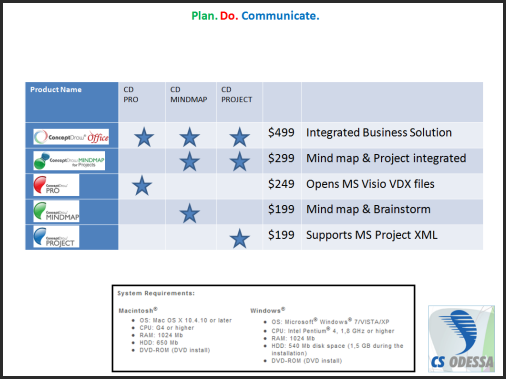
I have included a chart to show what is included in our products, plus the bundled products are our individual products. This brings great value to you our customers. (Click on image to make larger)
Tuesday, March 16, 2010
Sharing Our Blog with Readers Around the World

At CS Odessa, we use Sitemeter to keep track on blog traffic and reader locations. So many of our readers are from all over the world!
Up to date, there have been readers from places such as:
- South Africa
- Australia
- Sudan
- New Delhi
- Italy
- Germany
- France
- England
With social media the center of so much attention, we are thrilled to know that our blog has such a versatile readership! It is our goal of this blog to increase a sense of a ConceptDraw community among our users.
The point? We want to hear from you. All of you. From all over the world. Say anything. Tell us what you like about our posts. What you want to see in the future. What you ate for lunch! Share with us your thoughts and ideas on your latest mind maps.
If the entire world is opening up, then so should we!
Look forward to meeting you.....
Sunday, March 14, 2010
McGee on Pink

Dan Pink.
I've made a couple of references in the past to Jim McGee's "Musings" blog. He recently posted about one of my favorite modern cultural thinkers, Dan Pink. Enclosed in McGee's post is the presentation Pink did at TED. Go to Jim's blog and watch Dan Pink at TED.
As McGee says, "Once you begin to understand and accept what the evidence base says about motivation, you are left with the challenge of how to take advantage of your new understanding in the face of entrenched systems and practices that haven’t caught up with you. Sharing Pink’s book with your colleagues wouldn’t be a bad way to start."
I've mentioned TED before too. And if you haven't seen much of what goes on at TED, here's where you can go to find out all about the TED Conferences.
Monday, March 1, 2010
ConceptDraw MindWave Beta for Google Wave
ConceptDraw MindWave is a no charge plug-in for Google Wave that enables users to build maps with others in real time.
Share your ideas and processes with other team players at any momentum!
Read more on this amazing new solution and download instructions here.
Monday, February 22, 2010
ConceptDraw MINDMAP Tutorial: Improve Your Meetings PART 2
You can also watch the YouTube version of Part 2 of using ConceptDraw MINDMAP to improve meetings.
Subscribe to CSO: The World of ConceptDraw.
Tuesday, February 9, 2010
PC World Likes ConceptDraw MINDMAP 6.2
The reviewer also highights the fact that: "ConceptDraw Mindmap's 30-day demo offers users a full featured version of the product, including online and phone support--a surprisingly helpful and welcome addition in an era in which support isn't always available even for paying customers."
Just to be clear...Online and phone support is, of course, available not just for those who download the trial. It's there for you when you purchase MINDMAP too! :o)
Read PC World Review of ConceptDraw MINDMAP 6.2 .