News and thoughts from CS Odessa, maker of the ConceptDraw product line: ConceptDraw PRO, ConceptDraw PROJECT and ConceptDraw MINDMAP.

Tuesday, July 31, 2012

Mind Mapping for Writers

by Hobart Swan


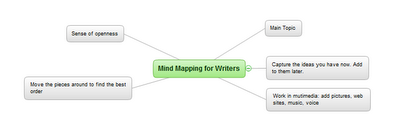
My goal in this article is to describe how you can use ConceptDraw MINDMAP to make your writing faster, easier, and more coherent. The crux of my argument will be the use of outlines. But before you drift into a painful reverie of high school English assignments, let me make a distinction: I’m not talking about the kind of linear process that forces you to stare at a blank page until you determine the very first thing you want to write. I’m talking about mind-mapped outlines that, for many writers, provide a sense of openness and liberation instead of restraint and anxiety. 

This approach to writing isn’t for everybody. There are as many approaches to the craft of writing as there are models of cell phones. But because mind mapping can be so transformative for some people, I encourage you to read on and see if it makes sense to you.

Marshalling your ideas

Let me start by saying that to prepare to write this article, I opened a mind map and just started jotting down, in no particular order, some of the things I wanted to address:


Figure 1: Quickly getting started

 
I’m not yet concerned with how the article will come together. I’m just brainstorming—entering ideas as they come to me. Later in the process, there will be time for detail (infinite detail, if that’s the way you like to prepare). In this very early stage, my goal is to capture as many ideas as I can. The following image may be too small for you to read. (If you want to see more detail, click on the link below the image to go to the ConceptDraw web site, where you can download a free trial version.) But it should give you an idea of how my ideas evolve and how the map automatically creates space on the page for me to capture them:

Figure 2: Automatic organization
The process of adding new ideas is as simple as using the Enter and Insert keys. ConceptDraw MINDMAP makes the process fast so you don’t have to pay attention to where on the page your new idea should go. You can simply keep your attention on coming up with ideas, and let the interface do the rest. 

The goal is to capture lots of ideas. But this isn’t a hard and fast rule. At any point in the process, you may decide that you want to do more thinking on one of the ideas. For instance, I want to do more thinking about the idea of how the creative writing  process can, at times, fall somewhere between composing a piece of music and painting:
Figure 3: Adding details
 
I could go back into the map and start embellishing more ideas. But I don’t want to get ahead of myself. There are lots of other things I want to make sure I put in this article. So I continue building up the map of my ideas.

Managing your ideas

At the top left of the above image, for instance, I added a branch labeled “mapping out.” This branch is particularly relevant for people who need to do a lot of research. This could be research about characters, places, plots, and chronology.

Figure 4: Various research topics
 
There are lots of things I want to say about this section. So I use one of my favorite features of ConceptDraw MINDMAP and turn this branch into its own map. I just put my cursor on the branch, right click, and choose “Send to new page” and I have a brand new map: 
Figure 5: Sent to a new Page
 
Now I can start adding ideas on how you can use mind maps to organize information on these topics:

Figure 6: Fleshing out the research
 
Note that right up above the center of the map is a little piece of chain: 

Figure 7: Hyperlink icon detail
 
The chain icon symbolizes a hyperlink. When you created that new map, ConceptDraw automatically created a link from this map back to the first map you created. And on that map, you’ll see another link of that will take you from the main map to the “mapping out” map. In this way, you can quickly toggle back and forth between the two maps.

Figure 8: Original map w/link icon
 
Using mind mapping this way can be an awesome jump start to your writing process. Now that we’ve got the basic concept down, tune in next week and we’ll delve into a “case study” of how to use mind mapping for planning a larger work.

Thursday, May 31, 2012

Vehicular Networking Solution Blog


CS Odessa’s latest addition to ConceptDraw Solution Park is the Vehicular Networking Solution for ConceptDraw PRO. Developed with assistance from researchers at Concordia University, this Solution puts ConceptDraw PRO at the forefront of diagramming for an exciting and rapidly growing area of network administration: global/vehicular networking.

This Solution contains two new templates (with example drawings), and  a huge variety of new library objects, all custom tailored to meet the challenges of mapping mobile Wi Fi networks onboard planes, trains, automobiles, and many more. The included templates help network engineers represent both local and global vehicular networks.

The first template, Local Vehicular Networking, is best used to describe communication between vehicles and stationary nodes in wireless networks, and to account for challenges presented by architecture within those networks. The second template, Global Networks, can be used to map wireless communication between vehicles, earth-based nodes, and space-based nodes on a continental and global scale. The library for this template also includes large architecture elements such as cities.

The new templates and library objects are an essential toolkit for todays’ network administrators, as demand for mobile Wi Fi shows no signs of slowing and vehicle manufacturers are racing to add hotspot technology to their products. Line objects specifically styled for representing fiber optic, wireless, and sensor network connections make visualizing connections between satellites, planes, transmitter towers, ships, cars, and many more virtually effortless.

Putting vehicular network diagrams together using these elements is simple and efficient. Check out these quick video tutorials to get an idea of how easily you can get started with the ConceptDraw Vehicular Networking Solution.


 21 day free trials of ConceptDraw PRO 9, the Vehicular Networking Solution, and all ConceptDraw products are available on ConceptDraw.com. Click on “Join Us” in the upper right of the homepage to get started. You can also follow @ConceptDraw on Twitter to stay current with the latest news and product releases. And of course stay tuned to our blog here for more tips, tricks and exciting announcements!   

Thursday, March 22, 2012

ConceptDraw Rapid UML

The newest Solution for ConceptDraw PRO 9, Rapid UML, presents a batch of new templates and library objects that integrate with ConceptDraw PRO’s intuitive RapidDraw feature to make object-oriented modeling for software systems easier than ever before.    

Included in the Rapid UML Solution are thirteen of the most commonly used UML diagrams, including Activity, Class, Communication, Component, Composite Structure, Deployment, Interaction Overview, Object, Package, Sequence, State Machine, Timing, and Use Case. Focusing on the Structure and Behavior categories, and the Interaction subcategory, these diagrams provide an essential set of tools for software engineers to conceptualize their systems before coding.

Many of this Solution’s Smart Objects utilize ConceptDraw PRO’s RapidDraw functionality in a new way. When placed into a drawing, simply hovering the mouse over them will display RapidDraw arrows from a variety of connection points. Hovering over one of the RapidDraw arrows will then display a menu of icons from which related diagram elements can be selected and automatically drawn. Check out this video to see it in action:


For those already familiar with ConceptDraw PRO and RapidDraw, you’ll see this is a whole new paradigm that makes UML diagramming practically effortless. Even very complex diagrams can be assembled in just minutes. Future additions to Solution Park will continue expanding on this new modality for RapidDraw, broadening its scope to include additional varieties of diagram. The Rapid UML Solution marks a new chapter for ConceptDraw PRO. From here on, expect to see even more tools that make it easier than you ever imagined to create the diagrams you need for your business.

Saturday, January 21, 2012

Computer & Networks Solution, Part 2

The Computers & Networks Solution has been one of our most popular Solutions since the launch of ConceptDraw PRO v9. Designed with IT professionals in mind, but easy enough for anyone to use, this Solution provides library objects, templates and examples for documenting network installations of any size. This discussion picks up right where we left off last time. See Part 1 for information about the Network Logical Structure Diagram, Network Communication Plan, Network Layout Diagram, and Rack Diagram templates.

The next component of the Computer & Networks Solution is the Server Services Scheme. This is a template for ConceptDraw MINDMAP that describes your utilized services and database servers. It creates a mind map showing the running services/virtual machines and hardware configuration of each server, as well as their relationships in your overall network. From the Input section of ConceptDraw MINDMAP, select Universal Diagramming>Computers & Networks>Servers. The new document contains three pages. The first shows the relationships of all the servers on your network, with two branches for internal and external. (The other two pages are examples for subsequent pages.) Create a new topic for each of your servers under the appropriate heading, then select one and right-click. From the context menu, select Send to New Page. This adds a new page to the document, connected by a hyperlink to the original page. On the new page, you’ll see the Main Idea is already labeled with the server name. The first topic you add should be the hardware information for the server (see the example pages). In the subsequent topics, describe the services for that server. Then you can return to the first page and create sub pages for each server in the same way. When you’re done, you’ll probably want to remove the sample pages.

Last but not least, we have the Interactive Voice Response template. This is a flowchart style template for ConceptDraw PRO that models the flow of information through your company’s phone network. Once you load up the example, it’s a simple matter to add shapes from the library, and edit or remove those in the drawing to show the way an outside caller navigates the nested menus of your phone system. Adding hyperlinks to shapes is an easy way to jump between multiple diagrams or to other documents such as scripts for operators and voicemail greetings.

The Computers & Networks Solution for ConceptDraw provides everything you need to document your network. IT professionals and novices alike will find the templates and sample drawings provide a great springboard for visually modeling all the necessary components of a network from high level conceptualization to real world implementation. Free 21 day trial versions of ConceptDraw products are available on ConceptDraw.com. Get started with yours today!

Thursday, January 19, 2012

CS Odessa Exhibits ConceptDraw at MacWorld 2012

That’s right: CS Odessa will be exhibiting at MacWorld this year and we could not be more excited! To celebrate, we’ll be offering a special on ConceptDraw Office that you’ll have to see to believe. The ConceptDraw Sales team will be in Booth #625 for the whole show, fielding questions and taking orders. This is an incredible opportunity to pick up the complete family of ConceptDraw products at a totally unprecedented value. Come see why ConceptDraw is the premiere cross-platform visualization and business productivity solution in the world, and take it home for a fraction of the usual price!

But wait, there’s more! We want to see you, our loyal readers, at MacWorld. So we are offering the first 100 people that follow this link http://rcsreg.com/macworld/CGA35239 a free guest pass to the show. You read that right: FREE for the first 100 people that register! So don’t wait. Click the link and register, and then check out ConceptDraw at Booth #625 in the MacWorld|iWorld Expo at Moscone Center in San Francisco, January 26-28, 2012. See you there!

Wednesday, December 28, 2011

ConceptDraw MINDMAP v7: The Importance of Importing Slides

The Presentation Exchange Solution for ConceptDraw MINDMAP adds the capability to import Microsoft® PowerPoint® slideshows and display their contents as a mind map. To see how this feature can benefit you in your everyday work, consider a few possible scenarios…


Scenario 1: Proposal Review

A major proposal to your company includes a PowerPoint slide deck. Clicking through the whole presentation will take far too much time, and in the process you can lose or obscure its meaning. With Presentation Exchange and ConceptDraw MINDMAP, you can easily extract the content and see how it fits together in a single view.

Olga: The entire management team needs to review those proposal slides before the end of the week. I just glanced at the file and there are over 50 slides! There’s no way we’ll have time for all this.

Jeff: You know, ConceptDraw MINDMAP just added this great ability to import from PowerPoint. We can just import that presentation into a mind map, and then distribute the map to our management team for review. You will save them so much time and headache; you might just get a promotion!

Olga: Brilliant, Jeff! You keep this up and you might just get that promotion.

Scenario 2: Presentation Revision

You have to give an important presentation to the Board of Directors on Friday. They picked apart the last presentation you gave, saying it was poorly organized and hard to follow. They felt you needed to do a better job of supporting your critical points. Why not try looking at your presentation in a new way: as a mind map?

Mary: I have to give the most important presentation of my life to the Board of Directors on Friday! And the last time I was in front of them, they were less then pleased.

Ignacio: I heard about how you went down in flames; it wasn’t a pretty sight. How about when you have the presentation completed, you import it into ConceptDraw MINDMAP? In a single view you can look over your slide content, see how the slides support one another, refine the story – the end result is that you’ll look much more professional.

Mary: Ignacio, you are a life saver! I never thought of doing that.

Scenario 3: Academia

The professor for your class has distributed slide presentations that contain lots of study content. Your challenge is to incorporate all the class materials to better leverage your study time. With Presentation Exchange, you can easily pull all that content into a mind map that illustrates the relationships between study topics.

Oscar: I think am going to fail the midterm tomorrow for our Supply Chain class. I’ve been studying from the PowerPoint slides the professor gave me, but it’s taking so long just to get organized. There are extensive notes on every slide! Thinking about it, I just know I am going to flunk that midterm. There’s not enough time left!

Elizabeth: The test for that class is going to be so easy. I finished studying for it yesterday.

Oscar: Yesterday?! How did you manage that?

Elizabeth: I have this cool program called ConceptDraw MINDMAP. I just imported the PowerPoint slides and all of the content appears in a mind map. It makes it super easy to organize. It brings all the notes from the slides in and everything. Then I can add more notes and even hyperlink to a web page or a supporting document. It cut my study time in half. It’s almost like magic!

Oscar: Oh man, that sounds great! I’d better go download it right away.

The Tip of the Iceberg

These are a just a few scenarios we imagined for how the Presentation Exchange Solution can make your daily life and work easier. How will YOU use it? Let us know via email to amersales@csodessa.com (Rest of World sales@csodessa.com, or follow us on Twitter @ConceptDraw.

21 day free trials of ConceptDraw MINDMAP, Presentation Exchange Solution, and all ConceptDraw products are available on ConceptDraw.com.