News and thoughts from CS Odessa, maker of the ConceptDraw product line: ConceptDraw PRO, ConceptDraw PROJECT and ConceptDraw MINDMAP.

Tuesday, November 20, 2012

Prepare Now for the Next Hurricane Sandy: Communicate Critical Information Faster, Clearer

"MINDMAP's visual interface gives the emergency planning team and our front line hospital staff a clear picture of what needs to happen in each emergency." Jill Collins

A Southern Hospital Creates Rapid-Action Planning
Jill Collins is an emergency management coordinator for a not-for-profit hospital in South Carolina. Part of her job includes managing the protocols, procedures, and policies put into place to deal with threats to the delivery of quality patient care. Collins uses ConceptDraw MINDMAP to manage and communicate planning and preparations for all of these potential problems.

Hobie: You missed the brunt of Sandy, but you still feel motivated to create an emergency plan?
Collins: Our hospital is accredited by The Joint Commission, which requires that we have a comprehensive emergency management program. Thankfully, true emergencies are infrequent... things like bad weather, chemical events, utility failures. Any one of these can compromise the hospital’s ability to function. Keeping staff prepared for events like these is an ongoing challenge. Hobie: Planning your response to emergencies like these must be very complicated. How do you manage it?
Collins: For each hazard, there are four phases of emergency management: mitigation, preparedness, response, and recovery. Within each of these four phases, the Joint Commission identifies six critical areas: communication, resources and assets, safety and security, patient management, staff responsibilities and utility management.

Inside of that overall planning, I need to be able to communicate specific plans for dealing with hazardous drugs and materials, medical equipment, utility safety, and the near-constant construction projects going on around the hospital. Then I have to explain each of these in relation to the five most likely emergencies, lay out planning for the four phases, and then show how we're prepared for the six critical areas in each phase.

Hobie: I can see how mapping would help. But how did you come to use it?
Collins: I first saw MINDMAP at a Fred Pryor professional training seminar and decided to see if it could help with this presentation. I opened up the program and just jumped into some really complicated brainstorming.

Once I finished that, I went back in and organized everything and added some additional information. Then I pushed a button and exported the whole thing into a PowerPoint presentation. I’ll tell you, seeing the PowerPoint presentations suddenly appear was the coolest thing since sliced bread. And I was just so tickled, because that was my first time using MINDMAP.

Hobie: So you use MINDMAP as a planning tool, then share it as PowerPoint slides?
Collins: No, no. That's just when I need to share an overview with management. Our hospital uses HICS, Hospital Incident Command System, a planning framework that assigns specific job tasks for each staff person’s role in the emergency. MINDMAP's visual interface gives the emergency planning team and our frontline hospital staff a clear picture of what needs to happen in each emergency.

It can also help me get buy-in on the planning since it clearly lays out each person’s role and the impact that role has in our overall handling of the emergency.

Needless to say, being able to confirm their role with a quick glance at a visual map is much easier for staff than having to plow through a text document or decipher a spread sheet.
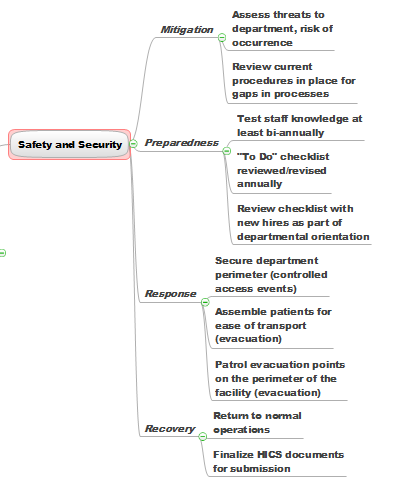
Hobie: Do you use MINDMAP in any other ways at the hospital?
Collins: We use it when we need to put our heads together and make sure we’re considering all the angles. "Is this one response recovery mode the duty of one nursing only? Or is it nursing and maybe respiratory therapy too—and maybe radiology." MindMap gives us the ability to collaborate on these questions and leave meetings with clear action plans.

Hobie: What would you say is the one big advantage MINDMAP offers over other ways you've tried to communicate complex information to people?
Collins: In any business situation—especially ones when tension can be high, the less wording and more action-oriented items you use to convey information, the better people can focus on the job at hand. The visual display ConceptDraw MINDMAP presents helps everyone focus in on the big things, and helps make complex things much easier to understand and act on.

Learn more about how to use ConceptDraw MINDMAP to solve your business challenges.

Friday, November 16, 2012

Collaborate Globally with MINDMAP and Skype

Watch videos on how to use ConceptDraw MINDMAP with Skype.

Hopefully you've heard the news about ConceptDraw MINDMAP's new integration with Skype. This new integration opens up the advantages of mapping to the estimated 250 million monthly Skype users. Our little, lovely pearl just got even a little smaller.

English is the Lingua Franca: Take Advantage of It.
The thing that continues to shine through is that mind mapping is simply the most effective and, really, the most pleasant way to convey information--across the office or across the world.

I talked to an in-house education specialist at a global firm who told me how effective mapping is at improving communications among people with different native languages. It's a pretty amazing concept--one that I doubt the creators of mind mapping ever contemplated. But it makes so much sense--especially in this age without national borders.

As this person pointed out, much of the confusion between languages has to do with how each language constructs a sentence. In one language it's subject, verb, object. In another, its the opposite. Some languages use articles. Some, like English, have a staggering number of irregular verbs and homnymns. The solution? Keep the key words of the sentence, but lose the sentence. This is exactly what mapping does. Using a combination of mapping and English as the common tongue, this company was able to significantly improve communication and participation with mapping.

Simple is Better, Clearer, Faster.
When you communicate in maps with single words or short phrases--rather than in sentences and paragraphs, it's easier for all participants to get the meaning. This is all the more true because of the way the maps put each piece of information in context.

You simply have to put yourself in the shoes of someone from another culture trying to deconstruct a text-filled page of information written in English. Think about what a challenge it would be. Then think about that same information captured in a ConceptDraw map. Your foreign colleagues and clients will love you for making their life easier.

With the combination of MINDMAP and Skype, you can hold global meetings centered on a map you can walk through slowly and deliberately--making sure all participants understand each point as you move around the map.

Do Faster, More Productive Meetings
Two big advantages of mapping are clarity and speed of communication. This new integration makes it possible to be quick and clear with your colleagues--whether they're located across town or across the ocean.

Monday, November 5, 2012

See Your Sales Data Graphically, Updated Instantly

CS Odessa has a lot of interesting videos on its website. This one, called How to Connect Dashboard to Data, shows you how to connect data to any of the various visual dashboard tools available in ConceptDraw Pro.

The cool thing about this is that it's very easy to do. Some of us like nothing better than to see spreadsheets of data. But for the rest of us, this video shows how easy it is to take any data stream and connect it to a speedometer-type visual object, or different kinds of live bar graphs as shown in the image above.

ConceptDraw PRO reaches into your data source every 5 seconds and refreshes the visual object.

Pretty cool if you like to see your up-to-date sales pipeline at a glance.

Find out more about ConceptDraw PRO.

What Comes Next After Social? Or, the rise of the steam-powered smart phone.

In the following post, I'm going to do what so many of us love to do in social media: I am going to opine. I am going to give you one person's perspective on something of importance to us all. And I'm not going to try to say it all in 140 characters.

What basis to do I have for thinking my opinion is worth you stopping and reading? The short answer is that I have no such basis at all. The long answer is that I'm counting on the relationship you the reader and I the writer have established in my time blogging for CS Odessa. If that's enough of a basis for you, then read on!

Is there a better way to feed ourselves than sitting around catching ants on a stick?
I'm a volunteer board member for an organization of "communicators" here in Boise. We're not exactly the top media market in the county. I'm sure we are far less sophisticated marketers, writers, and PR people than you will find in any major city. And yet, even in our little burg, you can hear the growing refrain: "What comes next after social media?"

At first, I thought this was all generational. I'm no spring chicken, and can remember the days when you would try to reach millions of people, not by following individuals like you and me on Twitter, but by taking influential reporters out for cocktails.

Not surprisingly, most of the people I asked about this said they would much rather go our for drinks than bang away at home on Twitter.

The Proper Care and Feeding of Influencers

The problem is that there are far too many "influencers" these days--each of them wielding far less influence than yesterday's media stars. There are so many influencers now, and they are so scattered about, that is takes forever to reach a sizeable chunk of them.

Steve Wildstrom,the tech reporter for Newsweek, is clearly an influencer. One of his columns can reach millions of people and influence them favorably or not toward any given product or service. But it can be very had to get Wildstrom's attention. Bloggers and tweeters, those social media influencers, are far easier to reach, and are often actively looking for things to write about. You just have to reach a lot of them to move the awareness needle.

And even when you reach them, you realize that that's not enough. Because what is true for Wildstrom is true for these scattered influencers: Simply "reaching" them isn't enough. You have to build a relationship with them. You have to build trust and authority with them. And that takes time. Lots of time.

Is it possible to learn to tweet while sound asleep?

And this is the issue keeping both professional communicators and entrepreneurs up at night. The question I hear from so many small business owners is how can they possibly find time to build all these relationships when they're trying to run a business? Where can they find the time to tweet five times a day, to post to Facebook a couple of times a week, to create or find meaty, relevant content for their website or blog or Facebook page?

Yes, there are numbers of younger people for whom "being social" is as natural as "being alive." Staying active on all the social media platforms comes as easy to them as breathing. For many of them, social media will just continue to grow in usefullness and importance.

But for many people who are either too old or too busy for the constant act of relating to others all day long, the question becomes; What's next?

The rise of the steam-powered smart phone
If I may digress a moment... I met a man this weekend who built his own massive outdoor oven and bakes his own bread. He also grows his own wheat. And he confirmed to me that it's wonderfully satisfying to know where the grain that makes your bread comes from. But he also confirmed what you might imagine: that it's a pain in the neck to personally go from the grain in the field to the fresh loaf on your table. That's why he has a big pile of unthreshed wheat sitting on the floor of his out building.

The truth is that this entrepreneur looks forward to mastering social media to build up his baking customer base about as much as he can't wait to hand thresh that pile of wheat. To him, and to many others like him, the kind of one-to-one communicating involved in social media seems as bizzarly antiquated, as out of step with modern reality as fetching your water from a stream.

Can you build relationships locally and sell globally?
Some people talk about "deep connections" as the next step forward. According to this theory, we will not base our behavior on the passing relationships we build with the many: We will have deep relationships with the few.

Someone told me about one record company that wanted to build a following for a new artist. But instead of doing the usual--usinig social to slowly create a following, they posted a couple of in-depth interviews with people--famous people--who knew and worked with the artist. The idea, I presume, was that a couple of great testimonials would carry as much weight as the individual opinions of thousands of fans.

This idea of "deep connections" may not be the answer. How many of us, after all, would be willing to listen to 15 minutes of one person talking about another person. And how willing would we be to be swayed by the opinion of just one or two people? We tend to know who we know, to respect the opinions of a few people we deal with on a regular basis. Is there some way to magically amplify the relationships we have with a small group of people so that we reach the millions?

Where exactly do you stand?

Just as surely as the laptop is going the way of the desktop, social media too shall pass. So what do you think could or should come next?

Friday, November 2, 2012

Create Strategic Marketing Plans 80% Faster

Jack Todaro manages business development, sales, and marketing for Oregon Aero, an aerospace company that designs and manufactures products primarily for aviation, law enforcement, and the military.

Todaro says that the success of a small company like his depends on fast, strategic thinking to succeed. He, in turn, depends on ConceptDraw MINDMAP to help him make sense of all the different data points that contribute to his strategic thinking.

Hobie: What kind of strategic thinking are you involved in?
Todaro: My job has a lot of different dimensions. I have to help conceptualize what products we want to develop, analyze what the marketplace is, help engineering develop the product, and then develop the strategies that will help us bring the right product to market and find the right buyers.

Hobie: What are some of the elements of these strategies?
Todaro: They include identifying how we’re going to approach the market—whether it's through trade shows, magazine ads, or direct mail, e-mail campaigns, sales calls, et cetera. I manage how the marketing program is put into effect, and I make sure that we capture and follow up on all of the leads we generate through marketing.

Hobie: You recently worked on a project to develop cushions for helicopters. What was that all about?
Todaro: All helicopters come with standard seats. But a U.S. government agency wanted cushions that would help pilots avoid the physical problems that come from sitting too long in one position.

Whenever we consider creating a new product, we have to think about how large the market will be. I used MINDMAP to assess our opportunities in law enforcement, medical evacuation, and the military. I started by looking at the U.S. market, where I learned that about 200 helicopters were being used by domestic law enforcement. So that’s the first market that we're going to go after.

But I also discovered that there were almost 4,000 of these helicopters throughout the world. So my next step was to map out who owns all of these helicopters, how they’re being used, and the best strategy to sell to these owners.

Hobie: How else do you use MINDMAP?
Todaro: I use it for all kinds of things. We just finished a show in Florida called Heli-Expo. All the major OEMs and customers attend it, so we wanted to have a big presence. I used MINDMAP to design a 20-foot booth, including seating and tables. Then I gave the mind map to the company that would create the booth, and we went back and forth until we landed on the right design.

Hobie: So you use mind mapping for a wide variety of projects. What's the common thread?
Todaro: If I had to choose the top two things I get from mind mapping, I’d say that it’s speed and quality. Mind mapping shortens my thinking time by about 80 percent—and that’s a huge benefit.

It also helps me get new ideas much faster. If I'm presented with a blank sheet of paper, I’ll just sit there thinking and thinking. But with MINDMAP, the ideas just flow. I can see how they all fit together—and that helps me sharpen my thinking. Mind mapping is just an extremely intuitive and fast way to work.

Find out how ConceptDraw MINDMAP can speed up your thinking and planning!

Wednesday, October 31, 2012

ConceptDraw and Evernote

CS Odessa announced this earlier in the month, but I wanted to make sure everyone saw it:

A new solution, Note Exchange, that lets you put ConceptDraw mind maps on Evernote with the press of a button, and then view them on any computer or mobile device.

You can save any part of a mind map, including topics, branches, and entire maps to Evernote, for instant access on any device. This means that ConceptDraw MINDMAP information can now be accessed from most smart phones, tablets and computers.

And since Evernote supports iOS, Android, Blackberry, Windows Phone, Web OS, Mac OS X, Windows, Safari, Chrome, and Firefox, ConceptDraw's new development dramatically opens the number of possibilities where you can use your map data.

Here's what you need to get started with ConceptDraw MINDMAP v 7.4 and Evernote.

How to Find a Fresh Angle for Your Writing

Dan Ochiva writes for a select group of top feature film editors. He also runs a popular website, NYCPP: NYC Production and Post News, about film and video production and post-production technology, facility openings and people making film and video industry news in the New York City area.

To stay current with local events—and to stay ahead of industry trends, Ochiva says he searches just about everywhere for news and information. He uses ConceptDraw MINDMAP as a single interface to capture all of these disparate information types.

Hobie: How do you get started on a new article?
Ochiva: Before I start writing, I’ll do a combination of interviews and research. I might visit user forums to see what new issues are on people’s minds, and what’s happening in research and development. I check out industry groups that might be holding meetings or giving talks about future trends. As I go through all this stuff, I'll put it all into a mind map. With so many mixed types of information to deal with, mapping helps me pull it all together and make sense of it.

Hobie: How did you first find out about mind mapping?
Ochiva: I started out just trying to find a better way to manage information. That led me to reading about mind mapping. At first, I did my own version of it. I’d buy these big sketch books—two or three feet on a side—and tape sheets to the wall, and hand draw the maps. I worked that way for a few years, and it helped. But then mind mapping software came along.

Hobie: You wrote an article about storage and networking in film and video post-production. But you were telling me that since these are such big topics, you wanted to find a way to focus what you wrote to help readers get their brains around something so complex. How did mind mapping help you do that?
Ochiva: There’s a certain kind of insight that comes from using mind mapping. I think that's due to a combination of seeing relationships between things and from being able to see everything on one screen. In planning the storage and networking article, I could see at a glance that a lot of people were thinking and writing about how hard it was to get the technology to work with the rest of the editing suite. So that helped me see a trend that I could address in my article. Being able to spot a trend early on is a great skill for a journalist to have, and mind maps really help you see the connections that are leading to trends.

Hobie: So how do you go from mapping to writing?
Ochiva: I use ConceptDraw's built-in numbering capability to organize the different nodes of the map into something that’s more or less what I think the final article will develop into. Then I just export it out as an RTF file, and just go from there. And I find that this saves me time and frustration since I don’t have to go through so many iterations to get to the final structure.

Hobie: Do you see yourself continuing to use mapping?
Ochiva: Oh, yeah. There've been some major changes in the industry over the years. So there’s a lot of information to keep in your head, juggle, and pull together to make sense of new developments. Mind mapping is by far the best way I've found to keep information fresh and viable because I can organize all this information in a way that makes sense to me. Instead of having to review a big file I've created, I can just scan the map. And it's easy to drop new information and ideas into the map as they occur. At the same time, I can visually navigate to go deeper into any one section of the map if I want more detail.

Hobie: Do you think mapping is particularly well-suited to writers?
Ochiva: I think that mind mapping helps you bring form to the information you’ve gathered and the ideas that've come from it. Knowing that you can add structure to information and ideas, and that that structure will make sense to you in the future, that’s a great benefit to me as a writer—and a great relief.

Learn more about how the ConceptDraw product suite can focus and accelerate your thinking.